GammaPDF

Open source · self-hosted · for people who read papers

Read papers.
Keep what you learn.

Gamma is a PDF annotator with outliner notes. Highlight and draw on papers, keep what you learn as nested blocks with live math, ask an AI about them, and search your whole library — on your own machine or a server you host.

Windows · macOS · Linux · Docker Latest release Source on GitHub

  • Highlights & ink
  • Outliner notes
  • Markdown + LaTeX
  • Ask an AI about your papers
  • Library search
  • Shared workspaces
  • Obsidian & Zotero import
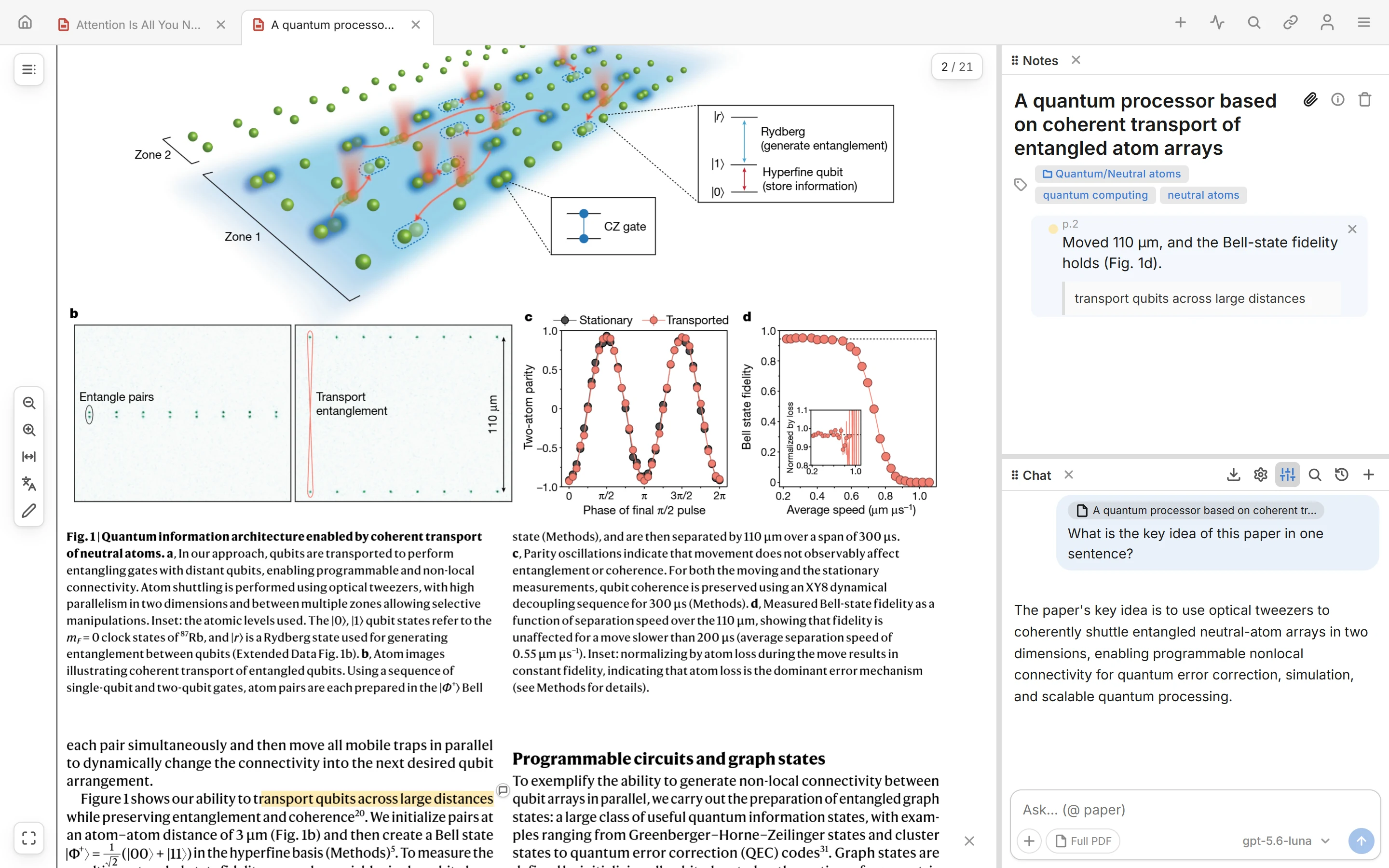


Gamma with a Nature paper open: a highlighted passage on the left, its outliner notes and an AI chat on the right

Your library, on your machine

Everything is SQLite and files in one folder — on your disk with the desktop app, or on a server you run. No account with us, no telemetry, no one else reads your papers.

Papers and notes are one thing

A highlight is a block. Nest it, link it, embed it in another page, search it, share it. Click it and the PDF jumps to the passage. The notes and the paper never drift apart.

Open source, open formats

Export a page or a folder as Markdown, an Obsidian vault, a Logseq graph, a Zotero library or an annotated PDF whenever you like. The code is on GitHub.

Highlight, annotate & draw

Mark up the paper. Every mark becomes a note.


Open a paper by pasting any link — arXiv, DOI or a publisher page; Gamma finds the PDF and falls back to a legal open-access copy when the DOI is paywalled — or drag the file in. Then:

  • Highlight — select text or drag a box around a figure, pick a color, add a comment. Each highlight becomes a block. Highlights already saved in the file by SumatraPDF, Acrobat or Preview are imported as blocks too.
  • Draw — use a stylus or mouse to circle a claim, sketch an arrow or highlight freely. Lasso strokes to move, resize, rotate or recolor them; erase whole strokes or just part of one. Ink becomes a note block linked to its place in the PDF.
  • Dockable panels — drag any window's grip to the left, right or bottom; double-click to collapse.
Highlighting a sentence, adding a linked annotation, then circling a claim and drawing an arrow with ink

Take notes

An outliner with live math, right next to the paper.


Highlights and free notes are the same kind of block, so a paper's notes and a plain page are edited the same way.

  • Outliner — Enter for a new block, Tab / Shift+Tab to nest, drag to reorder, one undo history for the whole page.

  • Live preview, Obsidian-style — markdown, $…$ / $$…$$ math, code fences, callouts and tables render in place while the block you're on stays raw. Math gets bracket-pair coloring, \command autocomplete and Tab hops between {} arguments.
  • Link and embed[[page]] mentions, ![[block]] embeds that edit the source in place, and a "/" menu for everything else.
  • Pictures and tables — paste an image and drag its edge to resize it; edit tables cell by cell.
Typing markdown and a live LaTeX equation, adding a callout, then pasting a picture and dragging to resize it

Native agentic

Ask an AI about your papers. Follow its citations back.

Chat with the open PDF, or several at once. Answers cite the page, and clicking a citation jumps to the passage it came from.

  • See what it sees — paste figures, dictate by voice, or attach the whole PDF so the model reads tables and plots.
  • Your provider, your key — Anthropic or OpenAI models, or sign in with your ChatGPT subscription. Nothing is sent to any AI service until you add one.
  • Mention a paper — type @ to attach a library page; its details and text stay in context.
  • Put the agent to work — search your library, read papers, compare findings, rename pages or file them into folders. Expand each tool step to inspect it.
Asking a question in PDF chat, following a citation to the source passage, then box-selecting a figure for a follow-up question

Link and organize

Papers arrive labeled. Ideas stay connected.

Metadata fills itself in when a paper arrives. Labels and folders keep the library in shape. Citations lead to the next paper, and Back returns you to where you were reading.
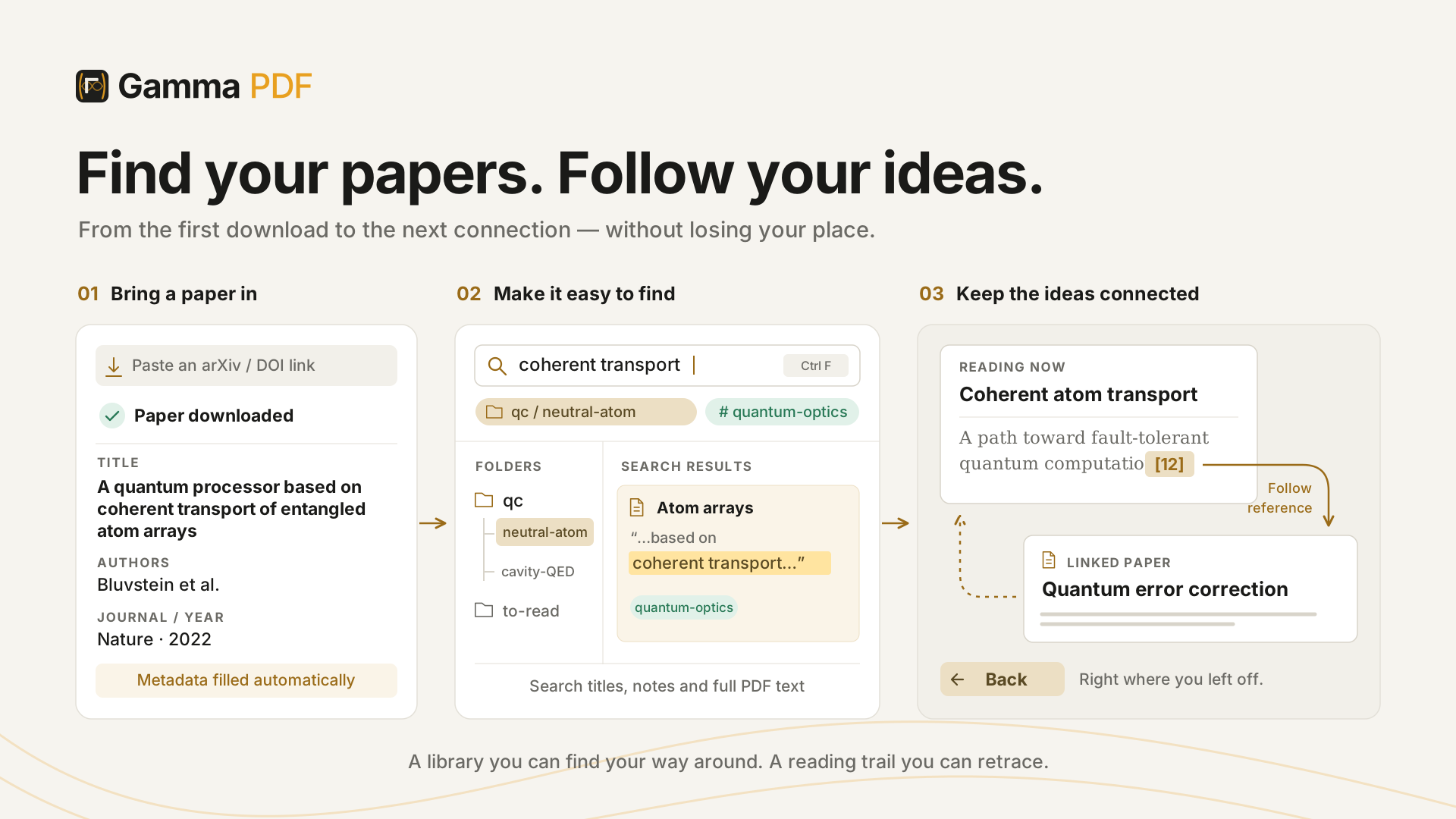


Bring a paper in with an arXiv or DOI link and its metadata fills in; search titles, notes and PDF text narrowed by folder and label; follow a reference to a linked paper and come back
Following a citation to its reference, then fetching the cited arXiv paper into Gamma with one click

Reference links

Citations in the PDF are clickable: jump to the reference, unwind jumps across documents with a global Back, and fetch a cited arXiv or DOI paper into your library in one click.

Searching titles and PDF text from home, narrowing with a folder chip, and opening a highlighted match

Search everything

Ctrl+F searches notes, highlights and the full text of every PDF at once, with match-case, whole-word and regex toggles. Narrow by label (an author) or by folder (qc pulls in everything beneath it). "3000" still finds "3,000-qubit" across a line break.


A freshly opened paper resolves its title, authors and venue; one click copies BibTeX or a slide-ready citation

Metadata & citations

On open, each paper is resolved (arXiv → DOI → AI) so title, authors and venue auto-fill; any field can be hand-edited. One click copies BibTeX or a slide-ready citation that pastes into PowerPoint with real italics.

Folders are paths: drop a paper into qc/neutral-atom and the hierarchy builds itself, and one paper can live in several folders. Labels are flat tags for cross-cutting facets like an author or a keyword.

Connect your research

At home in the tools you already use.

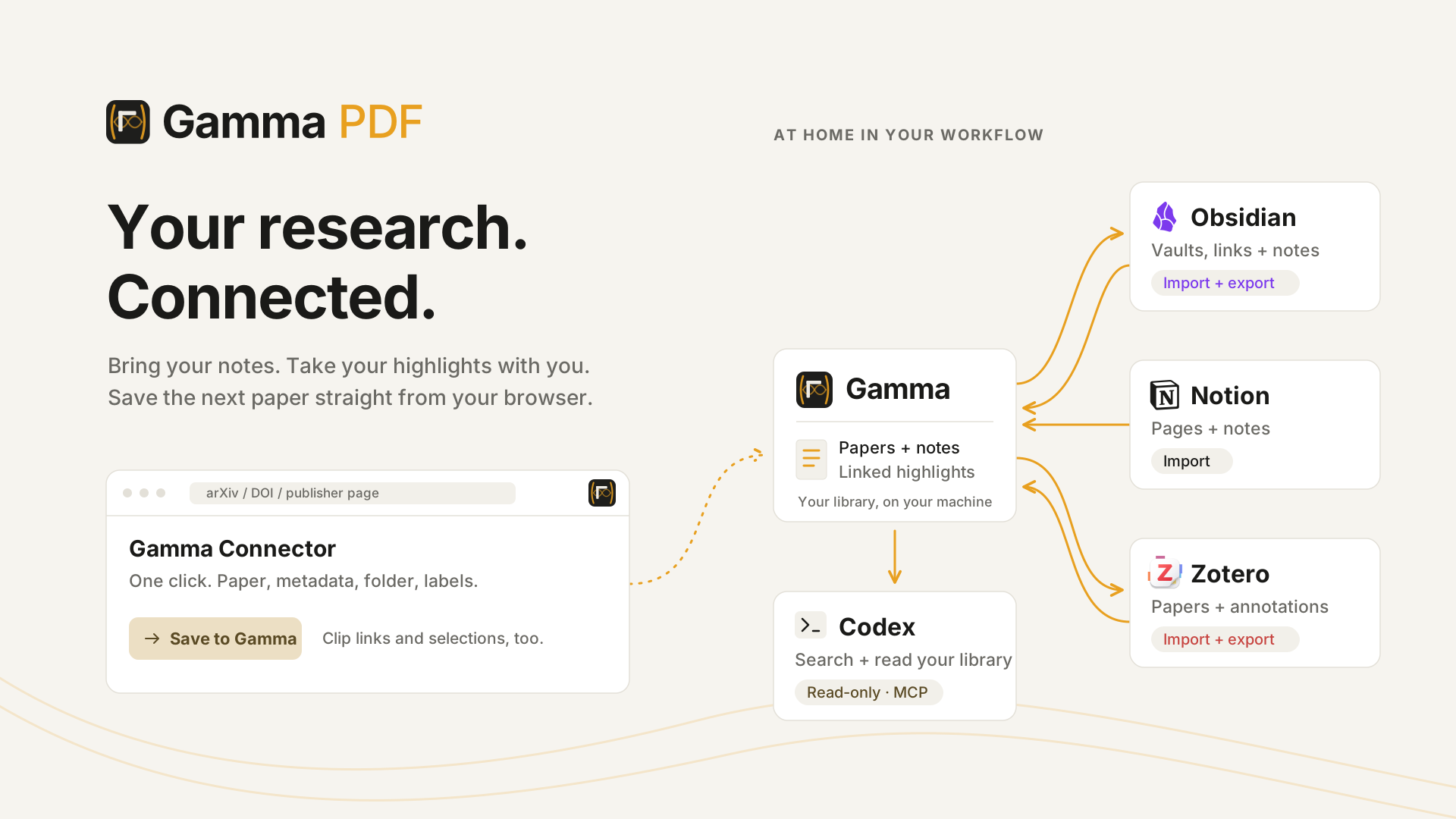
  • Gamma Connector — a browser extension that saves the paper you're reading in one click: PDF, metadata, folder and labels, straight from the arXiv, DOI or publisher tab. Right-click clips a link or a selection into your notes.
  • Import — Logseq PDF exports and Zotero libraries come in with their annotations; Markdown folders, Obsidian vaults (wikilinks, block embeds, tags) and Notion exports come in as notes.
  • Export — a page or folder as annotated PDF, Markdown, an Obsidian vault, a Logseq graph, a Zotero library, or a Gamma zip another Gamma can merge.
  • Assistants — let Codex or any MCP client search and read your papers, notes and highlights, read-only, for a workspace you approve.
Gamma in the middle of Obsidian, Notion and Zotero imports and exports, the Gamma Connector saving a paper from the browser, and Codex reading the library over MCP

Share, sync and move your data

Your space. A shared place.

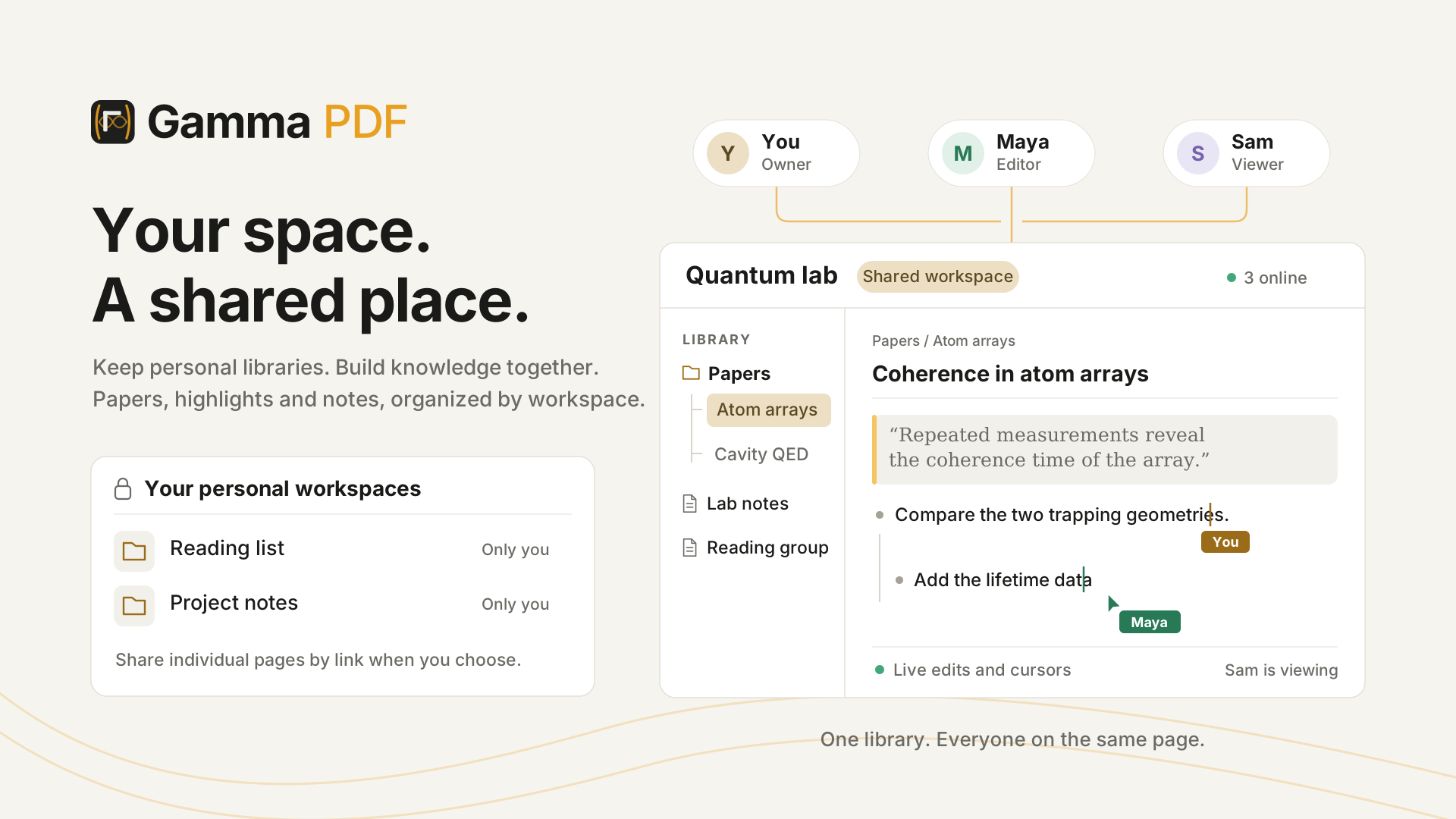
  • Workspaces — keep separate personal libraries, or collaborate in a shared library with owners, editors and viewers.
  • Share a page — send a link to an annotated paper; invite people with view or edit rights, or open it to anyone with the link.

  • Edit together — changes and cursors appear live; edits to different blocks coexist.
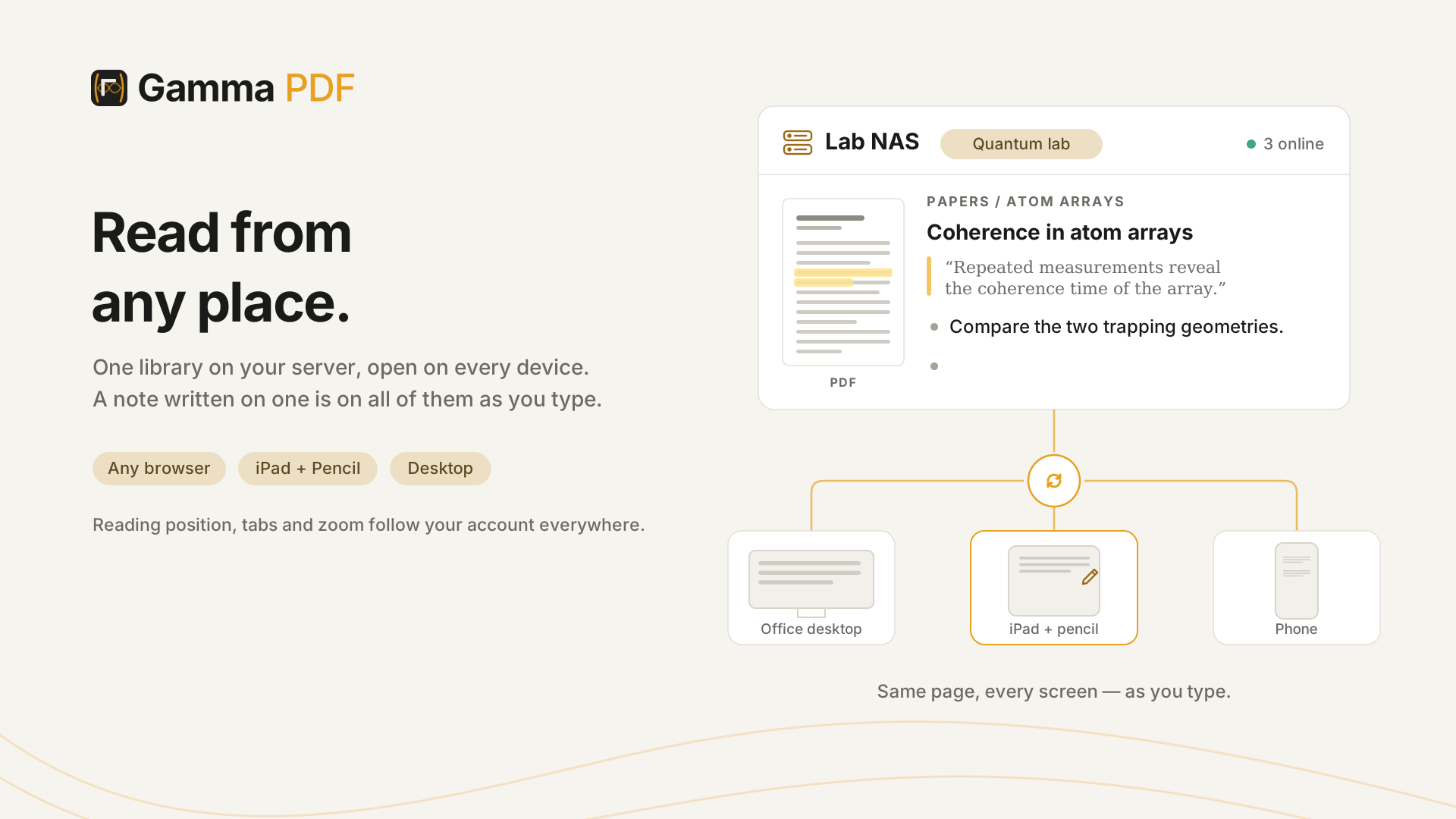
  • Tabs follow you — open tabs and reading positions sync per account and workspace.
  • Back up — export a workspace, or all of them, as one zip; keep server-side snapshots; restore or merge on another Gamma.
Personal workspaces next to a shared research library where an owner, an editor and a viewer work on the same page with live cursors

Get Gamma

Free, on every desk.

The desktop app is a self-contained Gamma with local libraries on your disk — no Docker, Python or Node. It also opens any Gamma server you host as another workspace. Latest release .

macOS

Download .dmg

Not notarized: on first launch, System Settings → Privacy & Security → Open Anyway, once.

Linux

Download .deb

Debian / Ubuntu, x64. Install with sudo apt install ./Gamma-*.deb. Updates itself.

Server

docker run -d --name gamma -p 9001:9001 -v gamma-data:/data ghcr.io/tim4431/gamma:latest

Multi-user, with shared workspaces. Open localhost:9001 and sign in as admin; the password is printed once to docker logs gamma. More on self-hosting ↓

Browser extension

Gamma Connector (.zip)

Unzip, then chrome://extensionsDeveloper modeLoad unpacked. Chrome, Edge and other Chromium browsers.

Codex & MCP

Connection guide

In Gamma, Settings → AI → External assistants gives a one-line setup command for the Codex plugin, and the server URL for any other MCP client.

Self-host

One container. Your whole lab.

The server is one Docker image (linux/amd64 and arm64) with everything inside: the API, the app, SQLite and your uploads under a single /data volume that survives upgrades. No environment variables are needed.

  • Accounts are managed in the app: an admin creates users, resets passwords and grants admin from the account menu.
  • Shared workspaces with owner / editor / viewer roles, per-workspace storage caps, and server-side backups in Settings.
  • AI providers are per user and stored server-side; keys are never sent back to the browser.
  • Put a TLS reverse proxy (Caddy, nginx) in front of port 9001 to use a domain — then the desktop app, the extension and MCP assistants can reach it too.

Full install notes on GitHub →

# Quickstart
docker run -d --name gamma -p 9001:9001 \
  -v gamma-data:/data ghcr.io/tim4431/gamma:latest
docker logs gamma        # the seeded admin password, printed once
# Docker Compose (recommended)
services:
  gamma:
    image: ghcr.io/tim4431/gamma:latest
    container_name: gamma
    restart: unless-stopped
    ports:
      - "9001:9001"
    volumes:
      - gamma-data:/data
volumes:
  gamma-data:

Your data stays yours

Runs on your machine. We never see your papers.

Nothing is collected

No telemetry, analytics, crash reporting or accounts hosted by us. The desktop app's only outbound call of its own is the update check against GitHub Releases.

Plain storage

A data directory of SQLite databases and your files. Copy it, back it up, move it to another computer or server.

Network only when you ask

Metadata lookups go to arXiv, Crossref and Unpaywall; AI requests go to the provider you configured with your own key. Nothing else.

Leave any time

Export everything as Markdown, an Obsidian vault, Logseq, Zotero, annotated PDFs, or one zip that any Gamma can restore.

Questions

Frequently asked

Is Gamma free?

Yes. Gamma is open source. Download the desktop app or run the Docker image; there are no plans, no seats and no account with us.

Where is my data?

In a data directory: SQLite databases plus your PDFs and images. With the desktop app it is a folder on your disk; on a server it is the /data volume. You can export a workspace, or all of them, as a zip at any time and restore it elsewhere.

Do I need an API key for the AI features?

Only if you want them. Add an Anthropic or OpenAI key in Settings, or sign in with a ChatGPT Plus/Pro subscription with no key at all. Until you do, Gamma contacts no AI service. Keys are stored on your own Gamma, per user.

Can I bring notes from Zotero, Obsidian, Logseq or Notion?

Yes. Zotero libraries and Logseq PDF exports import with their annotations; Obsidian vaults, Markdown folders and Notion exports import as notes. Export goes the other way too: Markdown, an Obsidian vault, a Logseq graph, a Zotero library, or annotated PDFs.

Can I work with my group?

A server administrator creates shared workspaces with owners, editors and viewers. Any page can also be shared by link with view or edit rights. Edits and cursors show up live for everyone on the page.

What about handwriting and tablets?

Ink works with a stylus or a mouse in the browser and the desktop app: draw, lasso, move, resize, erase part of a stroke, undo. There is no native tablet app yet.

Which platforms?

Desktop: Windows (Microsoft Store or installer), macOS (dmg), Debian/Ubuntu (deb). Server: Docker on linux/amd64 and arm64, or from source with Python 3.11+ and Node 18+. The desktop app can open a hosted server as another workspace.

Start with the next paper you open.